History Retrieval Optimization
This EIE provides multiple methods to retrieve historical data, at least one of which is optimized.
The non-optimized way to retrieve historical data uses static parameters like start date, end date, and index to define data retrieval. The number of messages retrieved by the non-optimized method might be greater than necessary and might include records you've already retrieved in a prior poll. This method for retrieving historical data ignores available cache information because the information is irrelevant to the non-optimized request. If a cache preexisted the non-optimized retrieval, the cache remains unaffected. If a cache did not preexist the non-optimized retrieval, the latest record retrieved is used to populate the cache.
The optimized ways to retrieve historical data take advantage of a host-side transaction cache that keeps track of one or two items, depending on EIE:
- The most recently retrieved record ID
- The most recently retrieved timestamp
The record ID and/or timestamp values are cached for each successful and partially successful retrieval. The cached information provides a starting point for subsequent optimized retrievals. Optimization is achieved by using this cached information to more quickly locate the new record(s) to poll and to reduce the number of messages by retrieving only the most recent historical data. A transaction cache is maintained for each historical data group ordinal. Cached transaction information is stored in the Device Definition Service (DDS) transaction as data group elements.
See the following subsections below for more information:
- Optimized Retrieval Method(s)
- To Initiate a Get Latest Request Using a Data Group
- To Initiate a Get Latest Request Using a UIS Command
For information about the data groups affected by historical data optimization, see Data Groups.
Optimized Retrieval Method
The optimized way to retrieve history data is called a Get Latest Data request. To "get latest" means to get history data that has been saved by the field device after the most recent timestamp cached by the host; it is the data you do not already have. Get Latest Data uses the latest successfully retrieved historical index record and timestamp combination as the point from which to collect history data in the next Get Latest Data request. This process ensures that, if properly used, you only get historical data that has not already been retrieved in a prior poll.
In the case of an initial poll (either the first poll of a device or after the cache is cleared), the latest successfully retrieved index record and timestamp combination are stored in the cache so that Get Latest Data optimization is available for subsequent polls.
|
Enter History Parameters Dialog Box |
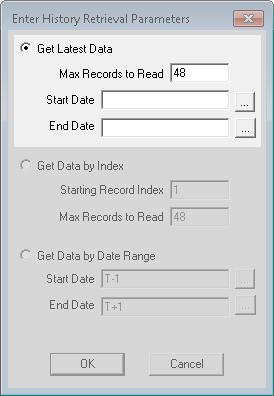
There are three different parameters associated with a Get Latest Data request, each of which may be combined with the others for different effects. They are as follows:
- Max Records to Read: This specifies the maximum number of historical records to retrieve. This number is not absolute; it specifies the maximum possible and is relative to the cache, number of records available, specified start date, and/or specified end date. If no cache exists, retrieval begins at the oldest record in the index and reads forward. If no cache exists and this option is used with a start date, the start date is honored.
- Start Date: This specifies the oldest date limit in a date-range request. For Enron history data groups, date-range history is retrieved index-by-index starting from the specified end date and working backwards until the specified start date is reached.
- End Date: This specifies the most recent date limit in a date-range request. For Enron history data groups, date-range history is retrieved index-by-index starting from the specified end date and working backwards until the specified start date is reached.
Best practice recommends creating a UIS command where Get Latest Data is selected, a Start Date value of T - 35 is specified, and an End Date value of T + 1 is specified. Issue the command on a recurring basis of fewer than 35 days to ensure that the latest data is always retrieved. If limiting communication traffic is a priority, consider using the Max Records to Read option as well.
Three Get Latest scenarios follow; each assumes that you are using the Get Latest option.
Scenario 1
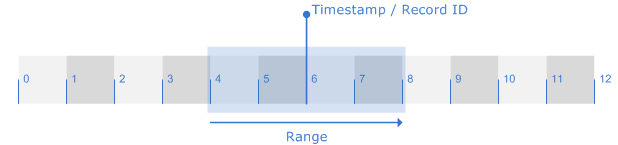
In this scenario, you request history data from a time window where the Start Date and End Date span the latest timestamp cached. The result is that only records that come after the latest timestamp and before or on the End Date (records 7 and 8) are retrieved and displayed. Records that come before the cache have already been retrieved. The cache is then updated to reflect the latest record retrieved (record 8).
|
Optimization Retrieval 1 |
Scenario 2
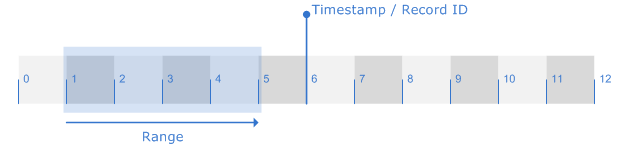
In this scenario, you request history data from a time window where both the Start Date and End Date are before the latest timestamp cached. The result is "No Data Available," which is returned because all available data has already been retrieved. The existing cache is left unchanged.
|
Optimization Retrieval 2 |
Scenario 3
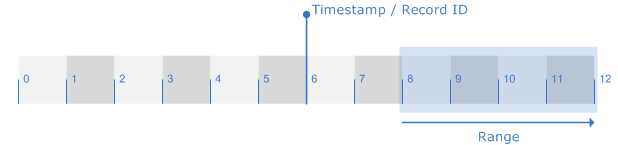
In this scenario, you request history data from a time window where both the Start Date and End Date are after the latest timestamp cached. The result is that only history data for the window specified (records 8 - 12) is retrieved. The cached timestamp is set to the last record retrieved (record 12). Data between the cached timestamp and the Start Date is ignored (record 7). You might use this option because you know data immediately after a latest timestamp is unreliable for some reason, so you want to ignore it but still get the latest reliable data and bring the cache up to date.
|
Optimization Retrieval 3 |
To Initiate a Get Latest Request Using a Data Group
Note: The following procedure is for a one-time poll. It is useful for testing purposes. For field deployment, schedule a UIS command to get latest.
- In the Device Definition Service (DDS), open the remote device you want to poll and click its Data Group page.
- Open the relevant historical data group and click Get from RTU.
- Select Get Latest.
- Specify retrieval parameters, like Start Date, End Date, and Max Records to Read. Different combinations of these parameters produce significantly different results. Max Records to Read limits the number of records to be retrieved in one request.
- Click OK.
To Initiate a Get Latest Request Using a UIS Command
- In the Device Definition Service (DDS), open the remote device you want to poll and click its UIS Commands page.
- Set up a UIS command to handle historical data retrievals.
- If available, activate the GetLatest command parameter (1=True, 0=False).
- If available, specify retrieval parameters, like Start Date, End Date, and Max Records to Read. Different combinations of these parameters produce significantly different results. Max Records to Read limits the number of records to be retrieved in one request.
- When you are finished defining the UIS command, click OK.
- If polling recurs on a regular basis, schedule polls in the Master Scheduling Service (MSS).


